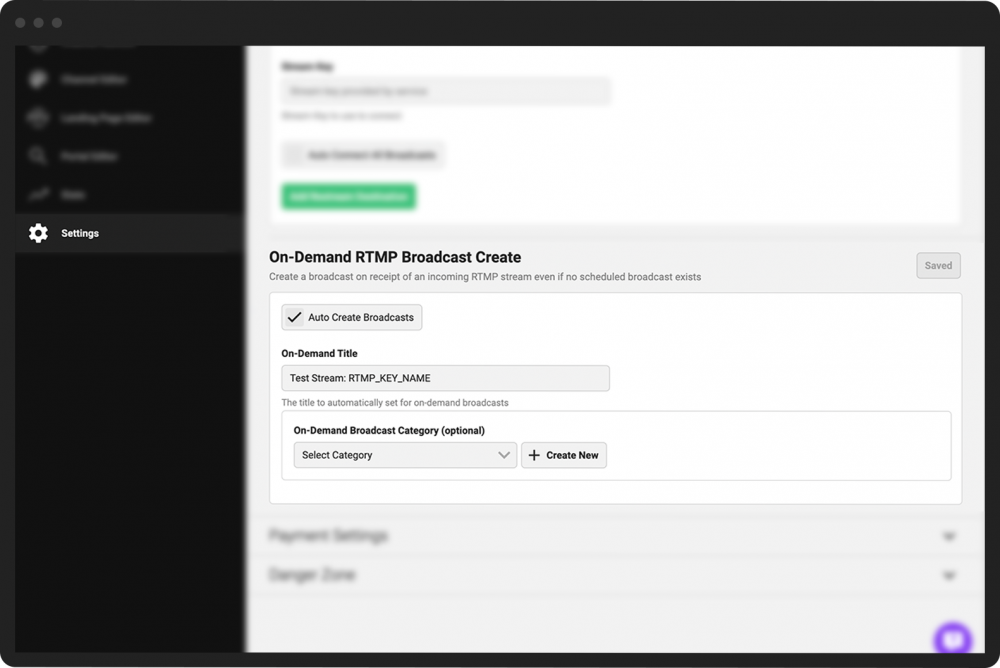
Enable on-demand RTMP broadcasts
PANDA can automatically create a new live broadcast of an incoming RTMP stream that comes in via one of your channel’s stream keys, even if you have not scheduled the broadcast in advance.
(For example, if you’re live streaming from Twitch and you’ve set up your Twitch account to stream to your PANDA stream key and host name, each time you start a new stream in Twitch, a new broadcast will automatically be created on your PANDA channel.)
To enable on-demand RTMP broadcasts for your channel:
- 1
From your Channel Dashboard click Settings from the bottom of the far-left menu.
- 2
Click the Broadcasting Settings menu.
- 3
Scroll down to the On-Demand RTMP Broadcast Create section.
- 4
Check the Auto Create Broadcasts box.
- 5
In the On-Demand Title field, enter the default title for your auto-created broadcasts.
- 6
Choose a category from the pulldown menu, if desired, to automatically assign a category to auto-created broadcasts.
- 7
Click the green Save button next to the On-Demand RTMP Broadcast Create heading.