

View your registered viewers and their profiles
Your PANDA dashboard provides you a list of all the users who have registered to view your network as well as for specific channels. You can also view each user’s specific profile page to learn more about their activity and manage their subscriptions.

From the main PANDA dashboard, click Registered Viewers from the far-left menu. Your total number of registered viewers will appear at the top of the screen.
Note: If desired, you can use the search box at the top of the page to search for a specific user by their name, username, or email address.
Your registered viewers will appear in a list with details of their viewing activity, including:
Their username, profile pic, and email address
Their number of views, and the date/time of their most recent view
Their subscriptions (if any)
The specific channels they viewed

From your Channel Dashboard, click Viewers from the far-left menu.
From your list of registered network or channel viewers (see above), click the username or profile icon of a specific viewer.
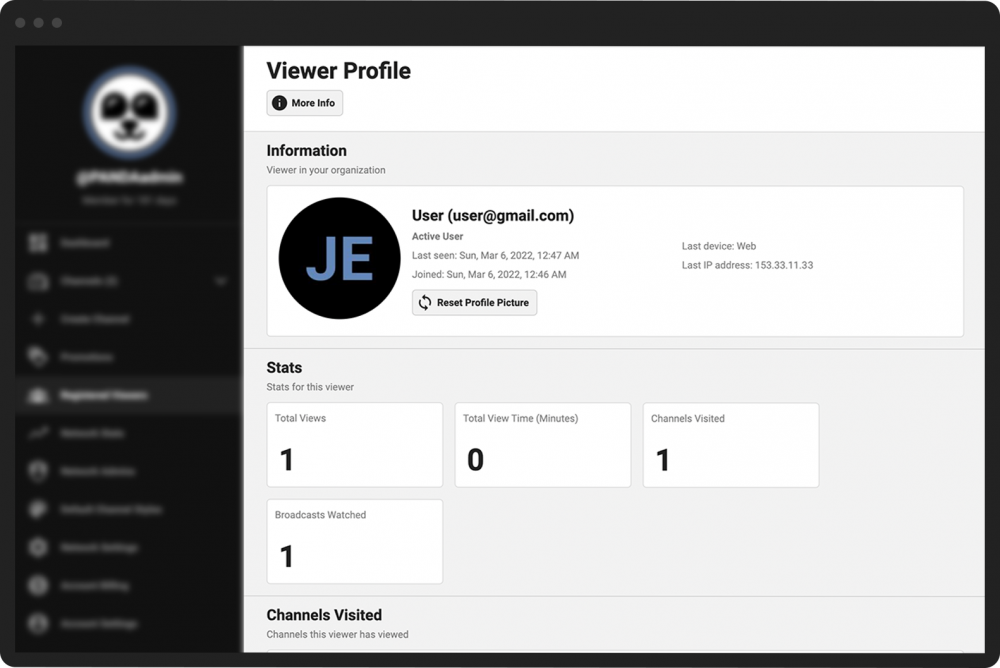
From a viewer’s profile page, you can:
See when the user joined, when they were last active on the site, which type of device they used (e.g., web or mobile), and their IP address.
Reset their profile picture to the network default (click the Reset Profile Picture button in the top box).
View their overall stats, including total views, total view time, number of channels visited, and number of broadcasts viewed.
View their active and expired subscriptions.
Disable a viewer’s subscription (click the Disable Subscription button under the subscription status).
Note: Disabling a subscription happens immediately when you click the button and cannot be undone. If you disable a viewer’s subscription by mistake, they will need to sign up for a new subscription.